DescriptionQtyRateAmount
Thank you for your business.Interactive demo · resets on refresh
- Subtotal
- $2,320
- $116
- Total
- $2,436
 hitSlop
Local-first mini apps for macOS
A packing list for one trip. A timer shaped like a tomato. A weird little desktop experiment you’ve been meaning to try. Each .slop is a single file that lives on your desktop, and your AI can edit it too.
Coming soon: live collaboration, Windows + iOS
Interactive demo · resets on refresh
A little less on your mind.
2 left to do1 / 3
Drag us around!
Every window here is a tiny app. ♥
Interactive demo · resets on refresh
Thank you for your business.Interactive demo · resets on refresh
Interactive previews in your browser. The real ones live on your desktop.
52 tiny apps, included
Every one of these comes with hitSlop. Pick one, make a copy, and it’s yours to use, change, or send to a friend.
Make your own
Run one command, say what your slop should do, and pick your agent. It builds the app while you watch it take shape in your browser. When it feels right, build a .slop and put it on your desktop. You keep the source and the finished app.
Needs Bun and any coding agent you like. Svelte and your favorite CSS inside.
# Make a project
bunx hitslop init my-slop
What should your slop do?
A packing list for short trips. Group items by bag and show how many are left.
Author
You
Created /Users/you/my-slop. Run bun install in that directory, then bun run dev.
Which agent CLI should build your slop?
Launching Codex in ~/my-slop
# Try it in the browser while you refine it
bun run dev
Disposable preview: http://localhost:5173/
# Stop the preview, then build the finished app
bun run build
/Users/you/my-slop/dist/my-slop.slop
# Put it in hitSlop’s template catalog
bun run register
/Users/you/.hitslop/templates/my-slop.slop
my-slop.slopExample session · paths and build progress vary.You + your agent
Tick a box yourself, or ask your agent to run an app’s actions and edit its fields through the CLI. It’s the same live document either way, and the change shows up right away. Edit ▸ Undo includes agent edits too.
Try the commands, step by step1 of 2 done Try a checkbox
Discover the app’s actions
slop describe Today.slopFields
["tasks"]: list (insert, remove, move, replace)
["tasks",{"id":"$id"},"done"]: boolean (set)
Commands (slop call PATH NAME --args JSON)
Arguments accept only the listed fields.
addTask — Add an unfinished task and return its stable row ID.
text: string (required)Run a named action
slop call Today.slop addTask --args '{"text":"Book train"}'Example response
{"result":{"id":"train"},"ids":["train"]}Read its ID, then edit a field
slop get Today.slop{
"title": "Today",
"tasks": [
{
"$id": "draft",
"text": "Draft proposal",
"done": true,
"archived": false
},
{
"$id": "invoice",
"text": "Send invoice",
"done": false,
"archived": false
}
]
}slop apply Today.slop --op '{"type":"set","path":["tasks",{"id":"train"},"done"],"value":true}'Example response
{"ids":[]}A SQLite file, not an account

Every slop is one SQLite database on your Mac: the app and everything you save live together. Use Share a Copy to send a saved copy, including its files and colors, while you keep working. Close it before moving it in Finder. Any SQLite tool can open it to look inside.
appits name, shape and starting valuesassetsthe little app itselfartworkQuick Look preview and iconcheckpoint + updateseverything you’ve saveddocumentits own identity, your colors tooattachmentsphotos and files you addMake it yours
Ask your agent to make it purple, or use the theme commands. The colors stay with that document and carry into its exports. Try a palette.
A little less on your mind.
Send the first draft
DoneTake a walk without my phone
TodayMake a little room for the weekend
Todayslop theme set Today.slop --values '{"accent":"#6c16ed"}' {
"defaults": {
"accent": "#a43d59"
},
"overrides": {
"accent": "#6c16ed"
},
"effective": {
"accent": "#6c16ed"
}
}Grape Soda theme selected.
Desktop widgets
Keep your checklist on your Mac desktop, even with its window closed. Choose a small, medium or large widget, and click it to open the document when you need to do more.
Edit the document and its widget refreshes while hitSlop runs. Your list, your colors, right where you can see them.
Add a desktop widgetAvailable for Quick Checklist, Water Tracker, Grocery List, Reading Tracker, Habit Heatmap, Daily Planner, Assignment Tracker and Countdown Milestones. macOS controls update timing.
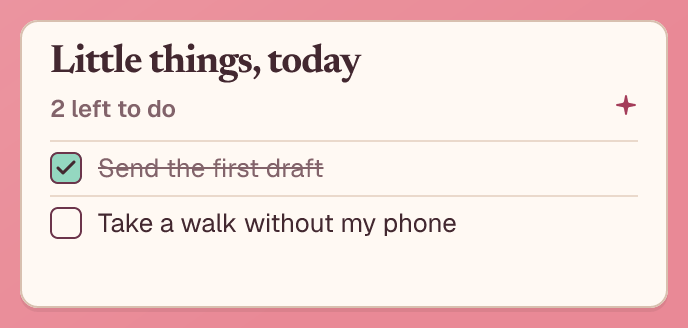 Medium
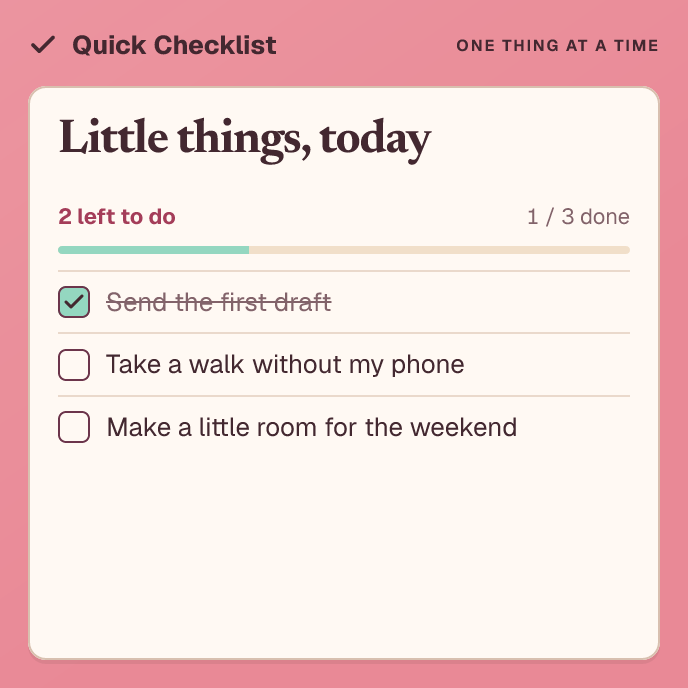 Large
Large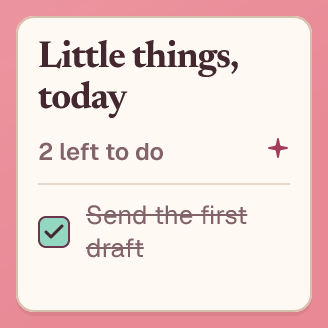 Small
SmallShare the result
Export a crisp PNG or a PDF with selectable text. Send the invoice, print the recipe, drop the plan in a group chat. Nobody needs to install anything.
Northwind Studio
For makers
Make a useful little app and hand it to a friend. hitSlop does the saving, the window, the export and the icon.
Build and share a templateComing soon
Plan a trip or split a list with friends, live. Collaboration is on the way; the people in this preview are pretend.
What’s plannedA tiny app or a living document, packaged as a single SQLite file. Open it, move it, share it, keep it. The interface and your data travel together.
You can look inside it: a .slop is a standard SQLite database, so any SQLite tool opens it and shows its tables. To use or edit it, open it in hitSlop or change it through the CLI. hitSlop is MIT-licensed, so the format is all in the open.
A whole collection: 52 tiny apps, from checklists, planners and journals to a tomato timer, an invoice, a radio and a koi pond, and we keep releasing more. Pick one from Templates and hitSlop makes you your own copy.
In the document on your Mac: one SQLite file, with the app and everything you save inside it. No account or document server. Apps that use online media still need the network.
Yes. A coding agent can build a slop from scratch, and it can change the tasks, notes and numbers in a document through the hitSlop CLI. It edits the same live document you have open.
Yes, when its author enables fullscreen, as Checklist and Hourglass do. Use the green fullscreen control or View ▸ Enter Full Screen. Flexible windows fill the screen; fixed or shaped designs scale to fit on a black backdrop. You can also pin a desktop window Always on Top.
Yes. Open the theme panel in any slop’s window to pick your own colors, and import or export a palette to share it. Your agent can do the same with the theme commands. Colors stay with that document. Authors change layout and structure in source and build a new version.
No. A document keeps the app version it was made with. A new build is available for new copies and never rewrites the ones you already use.
Yes, when its author includes a widget view. Open the document in hitSlop, add a hitSlop widget from the Mac widget gallery, and choose your document in Edit Widget. Small, medium and large sizes show saved content and refresh while hitSlop runs. macOS controls when updates appear; quitting hitSlop leaves the last image visible.
Yes. Export a crisp PNG, or a PDF with selectable text and vector output. Good for invoices, recipes, plans, or anything that needs to leave your desktop.
Live collaboration is coming soon. Today your documents stay on your Mac, and you can send copies or PNG and PDF exports.
Yes. hitSlop is free and open source under the MIT license.
Small files. Big ideas.
Free & open source · macOS 15.2+ on Apple silicon · Signed & notarized · Live collaboration coming soon